Followers

Showing posts with label perfect pearls. Show all posts

Thursday, July 17, 2025

Build Your Wings Mixed Media Canvas for Tres Jolie

 Good Morning Crafty Friends, 

I have a fun and simple canvas design for you today. We are using the July 2025 Mixed Media Kit. Creating this canvas was so relaxing, definitely had fun playing around with the mixed media products. I have a step by step down below as well as the video tutorial which has some bonus tips inside. Have fun and enjoy. Links are down below. 


July 2025 Mixed Media Kit


To get started I used a paint brush to place down my mod Podge only on half of the canvas at a time. Be sure to burnish down once you have one side done and then the other side. 


After adhering on the rice paper place a little bit of water on the edges of the excess to tear off the rice paper. **view video tutorial**


Next add some clear gesso down on the rice paper to prepare for the Jewel effect paste from the Mixed Media Kit. 


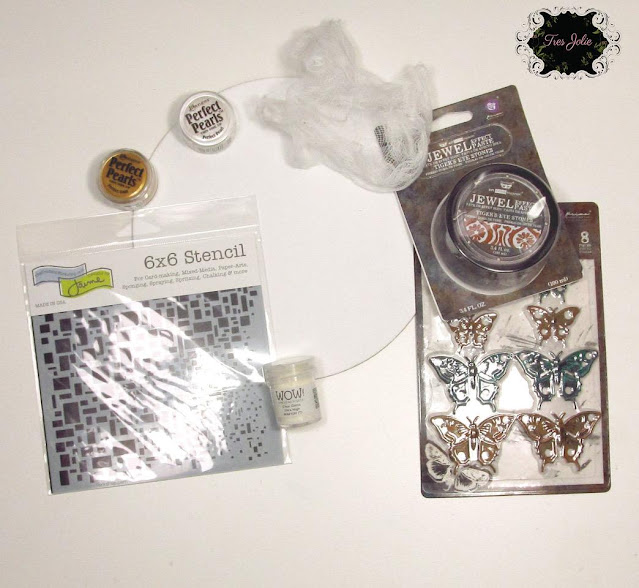
So to add a bit of fun I cut a little piece of cheesecloth and placed it in a small cut with a bit of gold perfect pearls and water. Mix a little and set aside for 1-2 minutes. 


Next take out the cheesecloth and airdry or you can use your heat tool to dry quickly. 


Next I adhered down the cheesecloth around the edges and up onto the canvas area. 
**view video tutorial for more details**


After adhering down the cheesecloth I then used the stencil and Tiger's eye stones Jewel Effect Paste to add a bit of texture to the canvas. 


I decided use the torn off portion from the rice paper and adhere to a paper frame from May 2025 Scrapbook Kit. These frames are amazing. 


Here is the finished canvas I added the mechanical Butterflies from the MM Kit and I used some flowers along with some sentiments from the Finnabair Sentiment Booklet from a previous kit. 


I hope you enjoyed today's step by step tutorial and are inspired to create a Mixed Media Canvas from the July 2025 Mixed Media Kit. I like the spent playing with the kits as you can be as creative as you want to be. I would love to see what you create with this Mixed Media Kit or anything you have created. 
I invite you to please stop by our Facebook page to see what new items our design team has created using our monthly kits.
You can always post your projects on Tres Jolie FB page - Tres Jolie Club Cafe. 

 Don't forget to post your project on our Facebook Group Page, link is down below. 
We would love to see what you create. 
 For more details you can always view the video tutorial process, which is at the top of the page. 
Thanks again for joining me, I have all the links listed for you throughout the post so just click on the words and you will be taken directly to the store. 

Enjoy and Happy Crafting. 


Don’t forget to follow us on all our social media:

Facebook: https://www.facebook.com/groups/121919621993809/

Instagram: https://www.instagram.com/tresjoliekits/


Tres Jolie website: https://tresjoliekits.com/

Tres Jolie subscriptions: https://tresjoliekits.com/services/

Saturday, October 5, 2024

Vintage Orchard Fall Wreath

 Hi Crafty Peeps, 

I hope you all are having a great weekend. This week we introduced the New Tres Jolie Kits for October 2024. So with that being said I have a fun project for you using the October Mixed Media Kit and some of the Laser Cut Elements from the Scrapbook Kit. You are going to love this fun Fall Wreath Project that takes no time at all. Both Kits are listed below along with my video tutorial and the step by step below. 


October Mixed Media Kit                                                     October Scrapbook Kit


To start with you will need any type of wreath you would like to use, I am using a grapevine wreath. We will be decorating this at the end. 
First we will stain the truck with our Little Birdie alcohol inks. I used the Marine Blue. Dab some on your surface and use a cotton ball to swipe up the ink and glide this along the truck area. To get into small areas the cotton ball is hard to read use a tooth pick or wooden skewer with a bit of cotton wrapped around the top, dip in your ink and color in the small colors.
I do this process for pumpkin, squash and gnome using different colors of the alcohol inks from the Mixed Media Kit. 


Next for the leaves I used the Paint Couture paint amazon from a previous kit , August Mixed Media Kit. 


Here is the finished truck. For the little mustache on the gnome I used a white gel pen. I traced around the image of the gnome with a black sharpie pen. Then I added some glossy accents to the word Fall, and the pumpkins and squash. The tires are colored black using the black gesso from the Mixed Media Kit. 


So this Fall Tres Jolie has some super cute chipboard pieces, here is the mushroom chipboard. For this one I colored in the acorns and the stem of the mushroom with a brown marker. for the leaves and the top of the mushroom I used the Perfect Pearls that came in the July Mixed Media Kit. 
First you want to place some water down on your mat, just a a drop or two, then place a little bit of perfect pearls down on the mat. Dampen the chipboard just a little with your paint brush using water, don' t get the chipboard very wet or it will get mushy. Next place some perfect pearls on your paint brush and brush onto the damp chipboard area and this will color your chipboard. I used Perfect Pearl colors spring green brilliant yellow, and pumpkin orange. 


Here is the cute little gnome that is new to the shop as well. I used my orange marker for hat, red marker for the apple and I used the paint couture amazon paint for the leaves. For the white beard I used white flock from my stash.  


Here is the finished wreath. For the foliage on top of the wreath tucked under the bow I used the Laser Cut Elements from the Scrapbook Kit which features 49 and Market Vintage Orchard Collection. 
Then I hot glued the truck down below, and added some leaves and flowers from my stash, lastly I glued on the chipboard mushroom and the little gnome. I did a couple of more laser cuts on top of the colorful leaves below. 


I hope you enjoyed today's step by step tutorial, remember I have the video tutorial for your convenience. I really enjoyed creating this Fall Wreath using the cute wooden truck and the new mushroom and gnome that are added to the shop. I hope you got some inspiration from today's project and head over to the shop to check out the New Mixed Media Kit with the Fall Truck, you can do so many things with this truck for a really nice Fall Decor. Place the truck in a picture frame or on a canvas how lovely would that be to decorate a mantle, a wall, or hang on a door. 
 Don't forget to post your project on our Facebook Group Page, link is down below.
 For more details you can always view the video tutorial process, which is at the top of the page. 
Thanks again for joining me, I have all the links listed for you throughout the post so just click on the words and you will be taken directly to the store. 

Wishing you all a great day and Happy Crafting.